

No Result
View All Result
DevRescue
  • Home
  • Python
  • Lists
  • Movies
  • Finance
  • Opinion
  • About
  • Contact Us
  • Home
  • Python
  • Lists
  • Movies
  • Finance
  • Opinion
  • About
  • Contact Us
DevRescue
Home Blog Python

Python TwoFish Encryption

by Khaleel O.
October 10, 2021
in Python
Reading Time: 4 mins read
A A
Python TwoFish Encryption

Let’s practice Python TwoFish Encryption! ✨✨ In the following example, we will encrypt a file on disk using TwoFish encryption and decrypt the same file on disk. Let’s go! 🙌🙌

Introduced in 1998, Twofish is a symmetric key block cipher with a block size of 128 bits (16 bytes) and key sizes up to 256 bits. This cipher is a Feistel Network, which is a cryptographic technique which works by splitting the data block into two equal pieces and applying encryption in multiple rounds. In each round, half of the text block is sent through a function, and then “XORed” with the other half of the text block.

We will be using Python 3.8.10. Also, you will need to install the twofish python library. You can do this with the following command: pip install twofish

Let’s write our code:

from twofish import Twofish

def tfencrypt(infile, outfile, password):

    bs = 16 #block size 16 bytes or 128 bits 
    plaintext=infile.read()

    if len(plaintext)%bs: #add padding 
	    padded_plaintext=str(plaintext+'%'*(bs-len(plaintext)%bs)).encode('utf-8')
    else:
	    padded_plaintext=plaintext.encode('utf-8')

    T = Twofish(str.encode(password))
    ciphertext=b''

    for x in range(int(len(padded_plaintext)/bs)):
	    ciphertext += T.encrypt(padded_plaintext[x*bs:(x+1)*bs])

    outfile.write(ciphertext)


def tfdecrypt(infile, outfile, password):

    bs = 16 #block size 16 bytes or 128 bits
    ciphertext = infile.read()
    T = Twofish(str.encode(password))
    plaintext=b''

    for x in range(int(len(ciphertext)/bs)):
        plaintext += T.decrypt(ciphertext[x*bs:(x+1)*bs])

    outfile.write(str.encode(plaintext.decode('utf-8').strip('%'))) #remove padding


password = '12345'

with open('infile.txt', 'r') as infile, open('outfile.txt', 'wb') as outfile:
    tfencrypt(infile, outfile, password)

with open('outfile.txt', 'rb') as infile, open('outfile_decrypted.txt', 'wb') as outfile:
    tfdecrypt(infile, outfile, password)


Let’s explain what’s going on here:

  1. We import our library twofish.
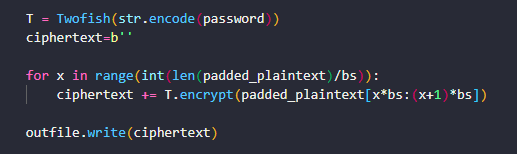
  2. We define our encryption function tfencrypt(). This function accepts 3 arguments: infile, outfile and password. We read the infile as plaintext and we pad it with a special character to ensure that its entire length is a multiple of the bs, which is our block size. In this case we used the ‘%’ symbol but it can be anything unique and different from the rest of the plaintext. We then define our cipher T by calling the function TwoFish() and supplying our password in bytes as an argument. Finally we encrypt the plaintext in equally size chunks or parts and save to the disk as the outfile. The object outfile will have encrypted ciphertext after this function executes.
  3. We define our decryption function tfdecrypt(). This simply does the encryption process in reverse. We supply the infile, outfile and the password, as before. The infile is the encrypted file that contains the ciphertext. We decrypt this in chunks or parts of equal size as before with our password and make sure to remove any padding from the final chunk that we inserted when we encrypted it. We then write the entire decrypted plaintext to the outfile. When this function executes, the outfile will have our original, decrypted plaintext.
  4. The password we define here is CRITICAL. In practice your password should be something more complex and isn’t easy to guess. We used a simple one for this example.
  5. We use a with statement to open the plaintext file for encryption and we do the same with the ciphertext to decrypt it.

Before running this example code you must prepare a file called infile.txt which must exist in the same folder as this script and should contain some text. When the script executes you will have 2 new files on the desktop:

  1. outfile.txt which will contain the ciphertext. This text will not be readable.
  2. outfile_decrypted.txt which will contain the plaintext after it has been successfully decrypted. We know the decryption worked if this file contains the exact same text as the original infile.txt.

Voila! We have successfully encrypted and decrypted a file in Python using TwoFish. Word of caution though, this is only an example. In practice you should absolutely use stronger and more robust means to encrypt your data, along with a stronger password. Use this code at your own risk! This was for demonstration purposes only.

Check out our Python AES Encryption Tutorial. Thanks for reading!

Tags: encryptiontwofish
Previous Post

Python Encrypt File with AES

Next Post

Python nltk Tokenize Example

Khaleel O.

Khaleel O.

I love to share, educate and help developers. I have 14+ years experience in IT. Currently transitioning from Systems Administration to DevOps. Avid reader, intellectual and dreamer. Enter Freely, Go safely, And leave something of the happiness you bring.

Related Posts

Python

Python Fibonacci Recursive Solution

by Khaleel O.
January 16, 2024
0
0

Let's do a Python Fibonacci Recursive Solution. Let's go! 🔥🔥🔥 The Fibonacci sequence is a series of numbers in which...

Read moreDetails
Python

Python Slice String List Tuple

by Khaleel O.
January 16, 2024
0
0

Let's do a Python Slice string list tuple how-to tutorial. Let's go! 🔥🔥🔥 In Python, a slice is a feature...

Read moreDetails
Python

Python Blowfish Encryption Example

by Khaleel O.
January 14, 2024
0
0

Let's do a Python Blowfish Encryption example. Let's go! 🔥 🔥 Blowfish is a symmetric-key block cipher algorithm designed for...

Read moreDetails
Python

Python Deque Methods

by Khaleel O.
January 14, 2024
0
0

In this post we'll list Python Deque Methods. Ready? Let's go! 🔥🔥🔥 A deque (double-ended queue) in Python is a...

Read moreDetails

DevRescue © 2021 All Rights Reserved. Privacy Policy. Cookie Policy

Manage your privacy

To provide the best experiences, we and our partners use technologies like cookies to store and/or access device information. Consenting to these technologies will allow us and our partners to process personal data such as browsing behavior or unique IDs on this site and show (non-) personalized ads. Not consenting or withdrawing consent, may adversely affect certain features and functions.

Click below to consent to the above or make granular choices. Your choices will be applied to this site only. You can change your settings at any time, including withdrawing your consent, by using the toggles on the Cookie Policy, or by clicking on the manage consent button at the bottom of the screen.

Functional Always active
The technical storage or access is strictly necessary for the legitimate purpose of enabling the use of a specific service explicitly requested by the subscriber or user, or for the sole purpose of carrying out the transmission of a communication over an electronic communications network.
Preferences
The technical storage or access is necessary for the legitimate purpose of storing preferences that are not requested by the subscriber or user.
Statistics
The technical storage or access that is used exclusively for statistical purposes. The technical storage or access that is used exclusively for anonymous statistical purposes. Without a subpoena, voluntary compliance on the part of your Internet Service Provider, or additional records from a third party, information stored or retrieved for this purpose alone cannot usually be used to identify you.
Marketing
The technical storage or access is required to create user profiles to send advertising, or to track the user on a website or across several websites for similar marketing purposes.
Statistics

Marketing

Features
Always active

Always active
  • Manage options
  • Manage services
  • Manage {vendor_count} vendors
  • Read more about these purposes
Manage options
  • {title}
  • {title}
  • {title}
Manage your privacy
To provide the best experiences, DevRescue.com will use technologies like cookies to store and/or access device information. Consenting to these technologies will allow us to process data such as browsing behavior or unique IDs on this site. Not consenting or withdrawing consent, may adversely affect certain features and functions.
Functional Always active
The technical storage or access is strictly necessary for the legitimate purpose of enabling the use of a specific service explicitly requested by the subscriber or user, or for the sole purpose of carrying out the transmission of a communication over an electronic communications network.
Preferences
The technical storage or access is necessary for the legitimate purpose of storing preferences that are not requested by the subscriber or user.
Statistics
The technical storage or access that is used exclusively for statistical purposes. The technical storage or access that is used exclusively for anonymous statistical purposes. Without a subpoena, voluntary compliance on the part of your Internet Service Provider, or additional records from a third party, information stored or retrieved for this purpose alone cannot usually be used to identify you.
Marketing
The technical storage or access is required to create user profiles to send advertising, or to track the user on a website or across several websites for similar marketing purposes.
Statistics

Marketing

Features
Always active

Always active
  • Manage options
  • Manage services
  • Manage {vendor_count} vendors
  • Read more about these purposes
Manage options
  • {title}
  • {title}
  • {title}
No Result
View All Result
  • Home
  • Python
  • Lists
  • Movies
  • Finance
  • Opinion
  • About
  • Contact Us

DevRescue © 2022 All Rights Reserved Privacy Policy