

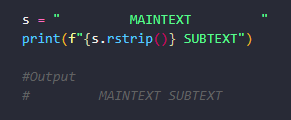
Python rstrip method allows us to strip or remove trailing characters to the right of a given string. The “r” in rstrip stands for Right. Here is an example:
s = "         MAINTEXT         "
print(f"{s.rstrip()} SUBTEXT")

#Output
#         MAINTEXT SUBTEXT
Let’s explain what is happening here:
- We declare a string s and we assign a value that has whitespace to the left and right of the MAINTEXT.
- We use the rstrip method of the s object to remove to strip the whitespace to the right of the MAINTEXT.
- When we print output we see the MAINTEXT is now missing the extra whitespace to its right. It now only has one space between the MAINTEXT and the SUBTEXT.
- We use an F-string in the form f”{}” to output the result of rstrip. Find out more about f-strings HERE.
- Because rstrip only works on the right hand side, the extra whitespace on the left is still there.
The above is the default behavior of rstrip. But this method also takes an optional argument characters which specifies a character that one wishes to strip or remove from the right side of a string.
s = "__________________MAINTEXT_____________________"
print(f"{s.rstrip('_')} SUBTEXT")

#output
#__________________MAINTEXT SUBTEXT
We supply the rstrip method with one parameter which is a string literal of the character we wish to strip or remove from the right side of the string s. In this case we want to remove the underscore ( _ ) character and note that our output shows that all of the underscores are stripped from the right hand side of the string s.
Finally, we can use rstrip to strip or remove multiple characters from a string.
s = "<<<<<<<<       FirstName         >>>>>>"
print(f"{s.rstrip('<> ')} LastName")

#output
#<<<<<<<<       FirstName LastName
In the above example we stripped three characters from the right: <, > and ‘ ‘ (whitespace).
Note that the characters have not been stripped from the left because rstrip only works on the right.
Thanks for reading! Find out more about rstrip, lstrip and strip HERE. 👌👌👌
