

No Result
View All Result
DevRescue
  • Home
  • Python
  • Lists
  • Movies
  • Finance
  • Opinion
  • About
  • Contact Us
  • Home
  • Python
  • Lists
  • Movies
  • Finance
  • Opinion
  • About
  • Contact Us
DevRescue
Home Blog Python

Python Timezone Now Tutorial

by Khaleel O.
June 9, 2021
in Python
Reading Time: 5 mins read
A A
python timezone now
python timezone now code

This Python Timezone now() tutorial will show you how to display the current time in another time zone.

Using the datetime library and pytz library (you can find information on both HERE and HERE), we can display time in another time zone in Python. If you don’t have pytz you can install it with pip install pytz at the command line. The below code will give us the information we are looking for:

from datetime import datetime
from pytz import timezone

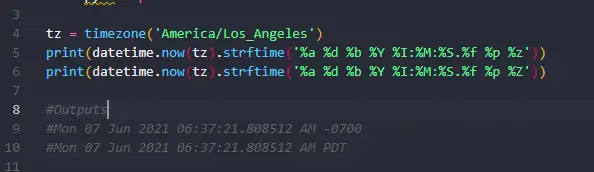
tz = timezone('America/Los_Angeles')
print(datetime.now(tz).strftime('%a %d %b %Y %I:%M:%S.%f %p %z'))
print(datetime.now(tz).strftime('%a %d %b %Y %I:%M:%S.%f %p %Z'))

#Outputs
#Wed 09 Jun 2021 04:34:42.578497 AM -0700
#Wed 09 Jun 2021 04:34:42.578497 AM PDT

tz = timezone('Europe/London')
print(datetime.now(tz).strftime('%a %d %b %Y %I:%M:%S.%f %p %z'))
print(datetime.now(tz).strftime('%a %d %b %Y %I:%M:%S.%f %p %Z'))

#Outputs
#Wed 09 Jun 2021 12:34:42.579473 PM +0100
#Wed 09 Jun 2021 12:34:42.579473 PM BST

tz = timezone('Europe/Paris')
print(datetime.now(tz).strftime('%a %d %b %Y %I:%M:%S.%f %p %z'))
print(datetime.now(tz).strftime('%a %d %b %Y %I:%M:%S.%f %p %Z'))

#Outputs
#Wed 09 Jun 2021 01:34:42.580484 PM +0200
#Wed 09 Jun 2021 01:34:42.580484 PM CEST

tz = timezone('Australia/Sydney')
print(datetime.now(tz).strftime('%a %d %b %Y %I:%M:%S.%f %p %z'))
print(datetime.now(tz).strftime('%a %d %b %Y %I:%M:%S.%f %p %Z'))

#Outputs
#Wed 09 Jun 2021 09:34:42.583539 PM +1000
#Wed 09 Jun 2021 09:34:42.584592 PM AEST

In the above we are able to see the current date and the time in 4 different time zones.

The key to solving this problem is the now() method and the timezone() method.

The now() method of class datetime returns the current date and time but also accepts an optional parameter for time zone called tz. We define the tz by assigning it the return value of method timezone() of class pytz. We also pass a string that represents the time zone name we are interested in. Find a list of time zones HERE and an article HERE for more information on time zones.

When we call now(tz) we get the current time in the time zone specified.

Using format codes and the strftime() method we can produce a detailed, formatted string that shows full date, time and time zone. Below is a partial list of format codes:

  • %Y: Year (4 digits)
  • %m: Month
  • %z: UTC Offset
  • %Z: Time zone name
  • %d: Day of month
  • %H: Hour (24 hour)
  • %M: Minutes
  • %S: Seconds
  • %f: Microseconds
  • %I: Hour 00-12
  • %p: AM/PM
  • %A: Weekday, full version

Be sure to consult the datetime documentation linked above for more information on formatting codes and strftime().

Obviously we will also want to know what the current, local time zone is at some point. We must first install the tzlocal package with the command pip install tzlocal at the command line. Below is the code:

import pytz 
from tzlocal import get_localzone
  
print(get_localzone())
#prints: America/La_Paz

And we can apply the same techniques to get the local date and time in the local time zone.

from datetime import datetime
from pytz import timezone
from tzlocal import get_localzone 


tz = get_localzone()
print(datetime.now(tz).strftime('%a %d %b %Y %I:%M:%S.%f %p %z'))
#prints: Wed 09 Jun 2021 08:10:58.768744 AM -0400

print(datetime.now(tz).strftime('%a %d %b %Y %I:%M:%S.%f %p %Z'))
#prints: Wed 09 Jun 2021 08:10:58.768744 AM -04

print(datetime.now().strftime('%a %d %b %Y %I:%M:%S.%f %p %z'))
#prints: Wed 09 Jun 2021 08:10:58.769742 AM

print(datetime.now().strftime('%a %d %b %Y %I:%M:%S.%f %p %Z'))
#prints: Wed 09 Jun 2021 08:10:58.769742 AM

Note that if you use the now() method without the tz parameter you will not get any time zone information in the printed date and time. We must use the tz parameter in the now() method to make our datetime ‘time zone aware’.

Want to know more about datetime and time zones in Python? Check out THIS article.

Use THIS GUIDE to find out how to get a list of all the available time zones in Python.

Thanks for reading! Hopefully you can now display time in another time zone in Python Cheers! 👌👌👌

Previous Post

Python Timezone List With Code

Next Post

What Is A Python Class? Let’s explain…

Khaleel O.

Khaleel O.

I love to share, educate and help developers. I have 14+ years experience in IT. Currently transitioning from Systems Administration to DevOps. Avid reader, intellectual and dreamer. Enter Freely, Go safely, And leave something of the happiness you bring.

Related Posts

Python

Python Fibonacci Recursive Solution

by Khaleel O.
January 16, 2024
0
0

Let's do a Python Fibonacci Recursive Solution. Let's go! 🔥🔥🔥 The Fibonacci sequence is a series of numbers in which...

Read moreDetails
Python

Python Slice String List Tuple

by Khaleel O.
January 16, 2024
0
0

Let's do a Python Slice string list tuple how-to tutorial. Let's go! 🔥🔥🔥 In Python, a slice is a feature...

Read moreDetails
Python

Python Blowfish Encryption Example

by Khaleel O.
January 14, 2024
0
0

Let's do a Python Blowfish Encryption example. Let's go! 🔥 🔥 Blowfish is a symmetric-key block cipher algorithm designed for...

Read moreDetails
Python

Python Deque Methods

by Khaleel O.
January 14, 2024
0
0

In this post we'll list Python Deque Methods. Ready? Let's go! 🔥🔥🔥 A deque (double-ended queue) in Python is a...

Read moreDetails

DevRescue © 2021 All Rights Reserved. Privacy Policy. Cookie Policy

Manage your privacy

To provide the best experiences, we and our partners use technologies like cookies to store and/or access device information. Consenting to these technologies will allow us and our partners to process personal data such as browsing behavior or unique IDs on this site and show (non-) personalized ads. Not consenting or withdrawing consent, may adversely affect certain features and functions.

Click below to consent to the above or make granular choices. Your choices will be applied to this site only. You can change your settings at any time, including withdrawing your consent, by using the toggles on the Cookie Policy, or by clicking on the manage consent button at the bottom of the screen.

Functional Always active
The technical storage or access is strictly necessary for the legitimate purpose of enabling the use of a specific service explicitly requested by the subscriber or user, or for the sole purpose of carrying out the transmission of a communication over an electronic communications network.
Preferences
The technical storage or access is necessary for the legitimate purpose of storing preferences that are not requested by the subscriber or user.
Statistics
The technical storage or access that is used exclusively for statistical purposes. The technical storage or access that is used exclusively for anonymous statistical purposes. Without a subpoena, voluntary compliance on the part of your Internet Service Provider, or additional records from a third party, information stored or retrieved for this purpose alone cannot usually be used to identify you.
Marketing
The technical storage or access is required to create user profiles to send advertising, or to track the user on a website or across several websites for similar marketing purposes.
Statistics

Marketing

Features
Always active

Always active
  • Manage options
  • Manage services
  • Manage {vendor_count} vendors
  • Read more about these purposes
Manage options
  • {title}
  • {title}
  • {title}
Manage your privacy
To provide the best experiences, DevRescue.com will use technologies like cookies to store and/or access device information. Consenting to these technologies will allow us to process data such as browsing behavior or unique IDs on this site. Not consenting or withdrawing consent, may adversely affect certain features and functions.
Functional Always active
The technical storage or access is strictly necessary for the legitimate purpose of enabling the use of a specific service explicitly requested by the subscriber or user, or for the sole purpose of carrying out the transmission of a communication over an electronic communications network.
Preferences
The technical storage or access is necessary for the legitimate purpose of storing preferences that are not requested by the subscriber or user.
Statistics
The technical storage or access that is used exclusively for statistical purposes. The technical storage or access that is used exclusively for anonymous statistical purposes. Without a subpoena, voluntary compliance on the part of your Internet Service Provider, or additional records from a third party, information stored or retrieved for this purpose alone cannot usually be used to identify you.
Marketing
The technical storage or access is required to create user profiles to send advertising, or to track the user on a website or across several websites for similar marketing purposes.
Statistics

Marketing

Features
Always active

Always active
  • Manage options
  • Manage services
  • Manage {vendor_count} vendors
  • Read more about these purposes
Manage options
  • {title}
  • {title}
  • {title}
No Result
View All Result
  • Home
  • Python
  • Lists
  • Movies
  • Finance
  • Opinion
  • About
  • Contact Us

DevRescue © 2022 All Rights Reserved Privacy Policy