


The Python smtplib library can be used to send emails from a Python script. Before you can do this however, you need to set up the following:
Once you do the above you can write your code:
import smtplib, ssl

sender_email = "[email protected]"
receiver_email = "[email protected]"

message = """\
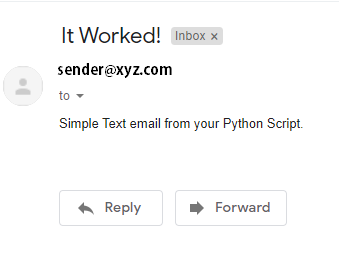
Subject: It Worked!
Simple Text email from your Python Script."""

port = 465

app_password = input("Enter Password: ")

context = ssl.create_default_context()
with smtplib.SMTP_SSL("smtp.gmail.com", port, context=context) as server:
    server.login("[email protected]", app_password)
    server.sendmail(sender_email, receiver_email, message)
Let’s explain what is happening here:
- Import smtplib and ssl libraries. The smtplib library defines an SMTP client session object that can be used to send email. The ssl library uses the OpenSSL library and provides access to Transport Layer Security (TLS) encryption and peer authentication facilities.
- We define the sender_email and receiver_email. The values used in the above code are for demonstration only, you will need to replace these values with valid email addresses.
- We define a simple email message as message.
- We define port as 465. Port number 465 is the default port for SMTP over SSL or SMTPS.
- We define app_password which will prompt the user at the terminal/console to input the 16-character app password you generated from your Gmail Account.
- The create_default_context() method returns a new SSLContext object with default settings for the given purpose. We will use this to create the SMTP session.
- We create our secure SMTP session. The SMTP_SSL() method encapsulates an SMTP connection as server. Since we are using the Google SMTP server we must supply smtp.gmail.com for the host parameter. Then we supply the port and then the context that we specified earlier.
- The login method logs into an SMTP server that requires authentication. We supply the GMAIL email address account that was used to generate the app password along with the app_password itself.
- The sendmail() method is what will send our mail message. It accepts the sender_email, receiver_email and message parameters.
When we execute this script we will be prompted for the app_password at the console/command line/shell. Be sure to input the correct value or else you will get the following error:
smtplib.SMTPAuthenticationError: (535, b'5.7.8 Username and Password not accepted. Learn more at\n5.7.8 https://support.google.com/mail/?p=BadCredentials g12sm7812946qtq.92 - gsmtp')If all goes well, you should see a new email in the receiver’s inbox that looks similar to below:
We hope that the above helped. Cheers! 👌👌👌
