


Hi! Let’s learn about the Elasticsearch Module for Python. We will be using Python 3.8.10. Let’s go! ⚡✨🔥
First released in 2010, Elasticsearch at its core is a full-text search engine and document store. Some common use cases of Elasticsearch include website and enterprise search, logging and log analytics, business analytics, application performance monitoring and much more.
Essentially, data flows into Elasticsearch from a variety of sources such as logs, metrics, applications etc. This raw data is processed and indexed in Elasticsearch after which users can run complex queries against the data to extract information and meaning. The processing of the raw data is also called data ingestion.
First we have to install the Elasticsearch server application. You can find the instructions HERE. Select the suitable package format for your operating system. Data is sent to Elasticsearch using REST APIs so you should be able to access the application via the default website when the installation completes and the service is started. The default URL will be in the installation guide. See below:
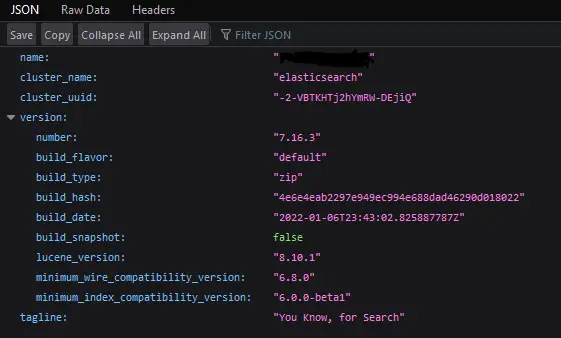
The Python Elasticsearch Module provides a low-level client for Elasticsearch. The next step after installing the application would be to install the python module with the following command: pip install elasticsearch
Now, let’s write a simple example:
from datetime import datetime
from elasticsearch import Elasticsearch

es = Elasticsearch()

doc = {
    'author': 'René Descartes',
    'text': 'I think, therefore I am',
    'timestamp': datetime.now(),
}

res = es.index(index="sample-index", id=1, document=doc)

res = es.get(index="sample-index", id=1)

es.indices.refresh(index="sample-index")

res = es.search(index="sample-index", query={"match_all": {}})

print(f"Found {res['hits']['total']['value']} ")

for hit in res['hits']['hits']:
    print(f'Time: {hit["_source"]["timestamp"]}')
    print(f'Author: {hit["_source"]["author"]}')
    print(f'Text: {hit["_source"]["text"]}')
Let’s explain what is happening here:
- We import the datetime module and most importantly the Elasticsearch module.
- The method Elasticsearch() returns es which is an object of class elasticsearch.client.Elasticsearch. We don’t supply any arguments explicitly, but by default it uses the Connection class defaults. This means that it will automatically reference the node at the default IP and Port Number configured for your installation of Elasticsearch (consult the installation guide linked above):
- When we installed and started an instance of the Elasticsearch web server we started a node.
- A collection of cocnnected nodes is called a cluster.
- We only have a single node of Elasticsearch so we have a cluster of one node.
- Object es is the Elasticsearch low-level client which connects Python to Elasticsearch REST endpoints.
- Elasticsearch exposes REST APIs that are used to access Elasticsearch features.
- The service at the default Elasticsearch URL is a REST API.
- Variable doc is our document. Recall that Elasticsearch is a document store. Documents in Elasticsearch are represented in JSON format. JSON is a text-based data format that uses attribute-value or key-value pairs. We have three attributes/keys in our simple JSON document: ‘author’, ‘text’ and ‘timestamp’.
- The method es.index() creates or updates a document in an index. An Elasticsearch index is a collection of documents that are related to each other. We supply 3 parameters: index, id and document.
- index is the name of the index, document is the document itself and id is the Document ID.
- Recall that we are interacting with the Elasticsearch API, so this method at its core, is an API request.
- Specifically, we are submitting PUT and POST requests to the single document Index API.
- An API request will receive a response. The response body is returned and stored as res. Variable res is of type dict and will contain, among other this, if the index operation was successful or not.
- The method es.get() will retrieve a single JSON document from the index. We supply only two parameters: index and id. The API request on this occasion are GET and HEAD requests.
- Parameter index is the name of the index that contains the document and id is the unique identifier of the document.
- The response body res will tell us if the operation was successful and also the contents of the specified document.
- The es.indicies.refresh() method will refresh the indices specified in parameter value index. In this case we are refreshing the sample-index we defined earlier. To refresh means to make all operations performed on the index, available for search. This may not be necessary because this is done automatically in the background by Elasticsearch.
- The es.search() method will search the specified index for hits and return results. In this case we are specifying the name of the index as index and the search query query.
- The search query query is defined using the full Query DSL (Domain Specific Language) provided by Elasticsearch. Find out more HERE.
- The query match_all:{} matches all documents.
- The specific API requests are GET and POST requests.
- The response res will contain, among other things, if there were any hits as well as the full JSON document body of the matching documents.
- Because we are matching all, all documents will be returned.
- We print the hits by accessing the value directly in the res response body.
- We print the JSON attributes and values by accessing the value directly in the res response body.
When the above, code executes and all goes well, you should get the following output:
#output
#Found 1
#Time: 2022-01-25T19:47:31.865346
#Author: René Descartes
#Text: I think, therefore I am
Now, let’s update the document in Elasticsearch. We can do this using the Update API. We are just including the snippet here. The full code will be included at the end. We are updating the document by its id, obviously. Here is our code:
doc_to_update = {
    'doc' : {
        'text': 'I THINK THEREFORE, I AM! COGITO ERGO SUM!',
    }
}

res = es.update(index="sample-index", id=1, body=doc_to_update)
Let’s explain what is happening here:
- We are doing a partial update so we specify the exact key/value pair in the original JSON document that we want to update. In this case, we are changing the text and adding additional words.
- The es.update() method will update document with id of 1 in index sample-index, with the changes specified in doc_to_update. We are only updating one key/value pair of our JSON document, hence the name partial update.
- We follow the usual process, run a search and the response body returned will show the updated document with the changes.
The above will give us the following output when executed:
#output
#Found 1
#Time: 2022-01-25T20:35:12.615905
#Author: René Descartes
#Text: I THINK THEREFORE, I AM! COGITO ERGO SUM!
Finally we can delete our document with the following code. One line of code will delete the specified document from the index. We will us use the es.delete() method and supply the name and id of the index we wish to delete:
res = es.delete(index="sample-index", id=1)
When executed, we will see the specified document no longer appear in the list of hits. This is exactly what we expect.
Here is our full code. I included an additional document so that we have a slightly more complete example:
from datetime import datetime
from elasticsearch import Elasticsearch

es = Elasticsearch()

doc = {
    'author': 'René Descartes',
    'text': 'I think, therefore I am',
    'timestamp': datetime.now(),
}

doc2 = {
    'author': 'Socrates',
    'text': 'Know Thyself!',
    'timestamp': datetime.now(),
}

res = es.index(index="sample-index", id=1, document=doc)
res = es.index(index="sample-index", id=2, document=doc2)

res = es.get(index="sample-index", id=1)

es.indices.refresh(index="sample-index")

res = es.search(index="sample-index", query={"match_all": {}})

print(f"Found {res['hits']['total']['value']} ")

for hit in res['hits']['hits']:
    print(f'Time: {hit["_source"]["timestamp"]}')
    print(f'Author: {hit["_source"]["author"]}')
    print(f'Text: {hit["_source"]["text"]}')

#################################UPDATE DOCUMENT###################################################

doc_to_update = {
    'doc' : {
        'text': 'I THINK THEREFORE, I AM! COGITO ERGO SUM!',
    }
}

res = es.update(index="sample-index", id=1, body=doc_to_update)

es.indices.refresh(index="sample-index")

res = es.search(index="sample-index", query={"match_all": {}})

print(f"Found {res['hits']['total']['value']} ")

for hit in res['hits']['hits']:
    print(f'Time: {hit["_source"]["timestamp"]}')
    print(f'Author: {hit["_source"]["author"]}')
    print(f'Text: {hit["_source"]["text"]}')


####################################DELETE DOCUMENT################################################

res = es.delete(index="sample-index", id=1)

es.indices.refresh(index="sample-index")

res = es.search(index="sample-index", query={"match_all": {}})

print(f"Found {res['hits']['total']['value']} ")

for hit in res['hits']['hits']:
    print(f'Time: {hit["_source"]["timestamp"]}')
    print(f'Author: {hit["_source"]["author"]}')
    print(f'Text: {hit["_source"]["text"]}')

#output
# Found 2
# Time: 2022-01-25T21:04:56.844726
# Author: René Descartes
# Text: I think, therefore I am
# Time: 2022-01-25T21:04:56.844726
# Author: Socrates
# Text: Know Thyself!
# Found 2
# Time: 2022-01-25T21:04:56.844726
# Author: Socrates
# Text: Know Thyself!
# Time: 2022-01-25T21:04:56.844726
# Author: René Descartes
# Text: I THINK THEREFORE, I AM! COGITO ERGO SUM!
# Found 1
# Time: 2022-01-25T21:04:56.844726
# Author: Socrates
# Text: Know Thyself!
We hope this tutorial helped. Find the Python Elasticsearch API documentation HERE and more about Elasticsearch itself HERE. Find another fantastic tutorial HERE. Thanks for reading. Good luck! 👌👌👌
