

Hi! This is a gentle introduction to the dnspython Python module. We will be using Python 3.8.10. Let’s go! ⚡✨✨⚡
The dnspython library allows us to query records against DNS servers and perform many other related operations. First we have to install the module, which we can do with the following command:
pip install dnspythonDone! Recall that DNS is the acronym for Domain Name System. It is a naming and identification system for computers, services and other devices on a network. With DNS, records are maintained that associate domain names with other pertinent information such as IP addresses.
A common DNS operation is a “DNS Lookup” or “DNS Query”. This is where we have the domain name and wish to find out the IP address associated with that domain name.
Now, let’s write some code:
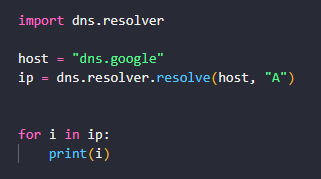
import dns.resolver

host = "dns.google"
ip = dns.resolver.resolve(host, "A")

for i in ip:
    print(i)

#output
#8.8.8.8
#8.8.4.4
Let’s explain what is happening here:
- First we import dns.resolver library. This is the method that will query the DNS server to find the IP address.
- The host is the domain name that we want to find the IP address for. We used domain dns.google for this example.
- The dns.resolver.resolve method accepts 9 parameters but in this case we are only supplying two: qname and rdtype. The qname is the name to be queried which is the host. The rdtype is the query record type which is “A”; the “A” stands for address. The “A” record is the most fundamental type of DNS record and refers to the IPv4 address DNS record.
- The return value of dns.resolver.resolve is of class dns.resolver.Answer and will be a list of IP addresses returned by the DNS server. This result will be stored as ip.
- Because ip is a list or sequence, we do a simple FOR loop to access and print its contents.
Simple right? When the code above executes you should get a list of one or more IPv4 address if a DNS record of type “A” exists for the domain name.
Sometimes you may want to query a specific DNS server, instead of relying on the normal default way. This can easily be done with the following code:
import dns.resolver

host = "dns.google"

resolver = dns.resolver.Resolver(configure=False)
dns.resolver.nameservers = "1.1.1.1"

ip = dns.resolver.resolve(host, "A")

for i in ip:
    print(i)
Let’s explain what is happening here:
- What we’re changing here is simply the DNS stub resolver, dns.resolver.Resolver. By default it uses the operating system settings but because we want to use a specific DNS server, we have to override that and set the parameter of configure to false.
- The dns.resolver.nameservers attribute allows us to establish the specific DNS server we wish to reference. In this case, we are using the free, public DNS resolver from Cloudflare with the address of 1.1.1.1
- Finally, we proceed in the usual manner to print the IP address ip which would be the “A” record for our host.
The “A” record isn’t the only type of DNS record, there is also the “NS” Record. The “NS” means nameserver and this record tells all requesters/clients where all the DNS records for the given domain are actually located. The nameserver is the server that stores all of the other records for the domain including the “A” record and other records such as the ‘MX’ and ‘AAAA’ records.
Because of its importance, most domains have more than one nameserver. Without the nameserver, requesters/clients will not be able to access the resource over the network. Let’s see how to retrieve this record:
import dns.resolver

host = "dns.google"
ip = dns.resolver.resolve(host, "NS")

for i in ip:
    print(i)

#output
#ns2.zdns.google.
#ns4.zdns.google.
#ns1.zdns.google.
#ns3.zdns.google.
Let’s explain what’s happening here:
- We import the dns.resolver library like before. We are also using the same host.
- The dns.resolver.resolve method is used again with the same qname but this time we supply the parameter “NS” for rdtype. This would give us the names of the nameservers.
- The result is stored as ip. Because ip is a list or sequence, we do a simple FOR loop to access and print its contents.
When the above code executes you will get the names of the nameservers.
Finally, let’s query all the records, we can do that with the following code:
import dns.resolver

host = "dns.google"

records = ['A','AAAA','NS','SOA','MX','TXT']
for record in records:
    try:
        responses = dns.resolver.resolve(host, record)
        print("\nResponse: ",record)
        print("-----------------------------------")
        for response in responses:
            print(response)
    except Exception as exception:
        print(f"{record} QUERY CANNOT BE RESOLVED")
        print("ERROR OBTAINING RECORD", exception)
Let’s explain what is going on here:
- We do the usual import and set our host to be the same as before.
- Because we are doing all the records, in addition to ‘A’ and ‘NS’ we specify:
- the ‘AAAA’ record contains the IPv6 address
- the ‘SOA’ record is the Start Of Authority record which contains important administrative info about the domain
- the ‘MX’ is the Mail Exchange record which specifies the mail server that handles mail for the domain
- the ‘TXT’ record stores text information or notes for sources outside the domain
- We loop though each record and print the contents of each response in responses.
- For those records that don’t have an entry or we don’t get a response we print an error message.
When the above code executes we will get the following output:
# Response:  A
# -----------------------------------
# 8.8.8.8
# 8.8.4.4

# Response:  AAAA
# -----------------------------------
# 2001:4860:4860::8844
# 2001:4860:4860::8888

# Response:  NS
# -----------------------------------
# ns3.zdns.google.
# ns4.zdns.google.
# ns1.zdns.google.
# ns2.zdns.google.

# Response:  SOA
# -----------------------------------
# ns1.zdns.google. cloud-dns-hostmaster.google.com. 1 21600 3600 259200 300
# MX QUERY CANNOT BE RESOLVED
# ERROR OBTAINING RECORD The DNS response does not contain an answer to the question: dns.google. IN MX

# Response:  TXT
# -----------------------------------
# "https://xkcd.com/1361/"
# "v=spf1 -all"
Ready to do a Reverse DNS Lookup? Have a IP address and want to find out the domain name? Check out THIS tutorial.
DNS is quite a complex subject. We only skimmed the surface here. Check out a more complete explanation of DNS HERE.
We hope this helped introduce you to dnspython. This module is very powerful and has many other functions. You can find the full dnspython documentation HERE. Good luck! 👌👌👌
