

No Result
View All Result
DevRescue
  • Home
  • Python
  • Lists
  • Movies
  • Finance
  • Opinion
  • About
  • Contact Us
  • Home
  • Python
  • Lists
  • Movies
  • Finance
  • Opinion
  • About
  • Contact Us
DevRescue
Home Blog Python

Python async await Example

by Khaleel O.
January 2, 2022
in Python
Reading Time: 5 mins read
A A
Python async await Example

Hi! Let’s do an example of async/await in Python. We will be using Python 3.8.10. Let’s go! ⚡⚡✨✨

Before getting started here, we strongly suggest you read our much simpler example of the async/await python syntax HERE for a foundation.

First, we will call one coroutine from another coroutine. Let’s write some code:

import asyncio, time, datetime

async def c():
    print(f'{datetime.datetime.strptime(time.ctime(), "%c")} Start')
    await asyncio.sleep(2.0)
    print(f'{datetime.datetime.strptime(time.ctime(), "%c")} Stop')
    return 777

async def main():
    result = await c()
    return result

asyncio.run(main())

Let’s explain what is happening here:

  1. First we import the asyncio library which will allow us to use the async/await syntax and functionality. We also import the time and datetime libraries.
  2. We define our first coroutine c() which prints a start time and date, pauses for 2 seconds and then prints the stop time and date. Recall that we must use the async keyword to declare a coroutine function and that the await keyword allows us to reference an awaitable object.
  3. The coroutine main() is our main entry point for this application. This is the coroutine that will call the other coroutine c(). The await keyword here is what allows us to call the other coroutine.
  4. Using the method asyncio.run() will run the main function.

If all goes well, executing this code will produce the following output. The first statement will be printed, followed by a two second pause and then second statement will be printed:

#Output
#2022-01-02 22:02:27 Start
#2022-01-02 22:02:29 Stop

Easy right? Let’s do another example!

import asyncio, time, datetime

async def c(delay, s):
    await asyncio.sleep(delay)
    print(s)

async def main():
    print(f'started at {datetime.datetime.strptime(time.ctime(),"%c")}')

    await c(3, 'start')
    await c(2, 'stop')

    print(f'stopped at {datetime.datetime.strptime(time.ctime(),"%c")}')

asyncio.run(main())

Let’s explain what is happening here:

  1. This time the coroutine c() accepts a delay amount in seconds and a string as parameters. It will sleep the program by delay seconds by calling the sleep() method and prints s to the screen.
  2. We print a start message with the date and time.
  3. We call the coroutine c from main, pass 3 seconds and string ‘start’.
  4. We call c again but this time we pass 2 seconds and string ‘stop’.
  5. We print a message telling us what time the program stopped.
  6. We call our asyncio.run() method to run our coroutines with main() as the entry point.

If all goes well, when the code executes we will get a first statement saying what time the execution started, a 3 second pause, another message that says ‘start’, a 2 second pause and a message that says ‘stop’ and then a 4th statement gives us the program stop time and date:

#output
#started at 2022-01-02 22:15:35
#start
#stop
#stopped at 2022-01-02 22:15:40

Note a difference of 5 seconds between the start and stop time. This is exactly what we expect to see.

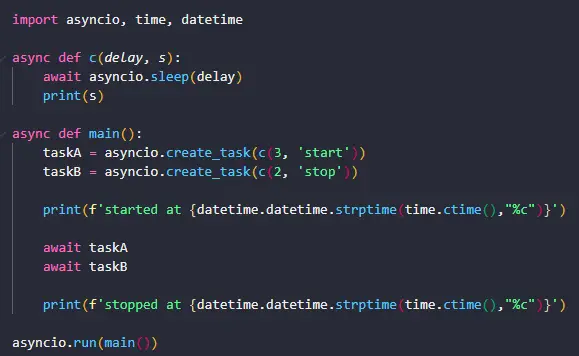
For our final example, let’s run our coroutines concurrently. This is actually the most powerful feature of the asyncio library. We will run 2 coroutines at the same time as tasks and we will see that our execution time will be faster:

import asyncio, time, datetime

async def c(delay, s):
    await asyncio.sleep(delay)
    print(s)

async def main():
    taskA = asyncio.create_task(c(3, 'start'))
    taskB = asyncio.create_task(c(2, 'stop'))

    print(f'started at {datetime.datetime.strptime(time.ctime(),"%c")}')

    await taskA
    await taskB

    print(f'stopped at {datetime.datetime.strptime(time.ctime(),"%c")}')

asyncio.run(main())

Let’s explain what is happening here:

  1. This time we are defining 2 tasks. Tasks are used to run coroutines in event loops. We have two tasks taskA and taskB, both of which are task objects initialized with the create_task() method. This method is what schedules the tasks’ execution. These two tasks will run at the same time, i.e. concurrently. We use the same parameters as before.
  2. We have two await statements one after the other, each one running its own task. Recall that the await keyword allows awaitable objects to run. Because we used tasks, both coroutines will execute at the same time and not one after the other as in the previous example. The program will wait until both await statements are completed before printing the final ‘stopped’ statement.
  3. As always we call our asyncio.run() method to get things going.

If all goes well, when the code executes we will get the following output:

#Output
#started at 2022-01-02 22:48:23
#stop
#start
#stopped at 2022-01-02 22:48:26

Note that this time the program took only 3 seconds between the start and stop time and not 5 as in the previous statement. This is because we leveraged the concurrency features of the asyncio python library to get better performance. In this case better performance meant a faster execution time. We did the same amount of tasks 2 seconds faster than before!

Note also that the stop message is printed BEFORE the start message because the coroutine that is responsible for printing it, is slept for a shorter time than the coroutine that prints the start message. When tasks run concurrently, the one that takes the shortest time finishes first.

So that’s it! We were able to do 3 examples of async/await in python. We hope this helped, you can find the full asyncio documentation HERE. Thanks for reading! 👌👌👌

Tags: asyncio
Previous Post

Python async await Simple Example

Next Post

Python base64 Encode PDF File

Khaleel O.

Khaleel O.

I love to share, educate and help developers. I have 14+ years experience in IT. Currently transitioning from Systems Administration to DevOps. Avid reader, intellectual and dreamer. Enter Freely, Go safely, And leave something of the happiness you bring.

Related Posts

Python

Python Fibonacci Recursive Solution

by Khaleel O.
January 16, 2024
0
0

Let's do a Python Fibonacci Recursive Solution. Let's go! 🔥🔥🔥 The Fibonacci sequence is a series of numbers in which...

Read moreDetails
Python

Python Slice String List Tuple

by Khaleel O.
January 16, 2024
0
0

Let's do a Python Slice string list tuple how-to tutorial. Let's go! 🔥🔥🔥 In Python, a slice is a feature...

Read moreDetails
Python

Python Blowfish Encryption Example

by Khaleel O.
January 14, 2024
0
0

Let's do a Python Blowfish Encryption example. Let's go! 🔥 🔥 Blowfish is a symmetric-key block cipher algorithm designed for...

Read moreDetails
Python

Python Deque Methods

by Khaleel O.
January 14, 2024
0
0

In this post we'll list Python Deque Methods. Ready? Let's go! 🔥🔥🔥 A deque (double-ended queue) in Python is a...

Read moreDetails

DevRescue © 2021 All Rights Reserved. Privacy Policy. Cookie Policy

Manage your privacy

To provide the best experiences, we and our partners use technologies like cookies to store and/or access device information. Consenting to these technologies will allow us and our partners to process personal data such as browsing behavior or unique IDs on this site and show (non-) personalized ads. Not consenting or withdrawing consent, may adversely affect certain features and functions.

Click below to consent to the above or make granular choices. Your choices will be applied to this site only. You can change your settings at any time, including withdrawing your consent, by using the toggles on the Cookie Policy, or by clicking on the manage consent button at the bottom of the screen.

Functional Always active
The technical storage or access is strictly necessary for the legitimate purpose of enabling the use of a specific service explicitly requested by the subscriber or user, or for the sole purpose of carrying out the transmission of a communication over an electronic communications network.
Preferences
The technical storage or access is necessary for the legitimate purpose of storing preferences that are not requested by the subscriber or user.
Statistics
The technical storage or access that is used exclusively for statistical purposes. The technical storage or access that is used exclusively for anonymous statistical purposes. Without a subpoena, voluntary compliance on the part of your Internet Service Provider, or additional records from a third party, information stored or retrieved for this purpose alone cannot usually be used to identify you.
Marketing
The technical storage or access is required to create user profiles to send advertising, or to track the user on a website or across several websites for similar marketing purposes.
Statistics

Marketing

Features
Always active

Always active
  • Manage options
  • Manage services
  • Manage {vendor_count} vendors
  • Read more about these purposes
Manage options
  • {title}
  • {title}
  • {title}
Manage your privacy
To provide the best experiences, DevRescue.com will use technologies like cookies to store and/or access device information. Consenting to these technologies will allow us to process data such as browsing behavior or unique IDs on this site. Not consenting or withdrawing consent, may adversely affect certain features and functions.
Functional Always active
The technical storage or access is strictly necessary for the legitimate purpose of enabling the use of a specific service explicitly requested by the subscriber or user, or for the sole purpose of carrying out the transmission of a communication over an electronic communications network.
Preferences
The technical storage or access is necessary for the legitimate purpose of storing preferences that are not requested by the subscriber or user.
Statistics
The technical storage or access that is used exclusively for statistical purposes. The technical storage or access that is used exclusively for anonymous statistical purposes. Without a subpoena, voluntary compliance on the part of your Internet Service Provider, or additional records from a third party, information stored or retrieved for this purpose alone cannot usually be used to identify you.
Marketing
The technical storage or access is required to create user profiles to send advertising, or to track the user on a website or across several websites for similar marketing purposes.
Statistics

Marketing

Features
Always active

Always active
  • Manage options
  • Manage services
  • Manage {vendor_count} vendors
  • Read more about these purposes
Manage options
  • {title}
  • {title}
  • {title}
No Result
View All Result
  • Home
  • Python
  • Lists
  • Movies
  • Finance
  • Opinion
  • About
  • Contact Us

DevRescue © 2022 All Rights Reserved Privacy Policy