

Hi! Let’s recreate the iconic Coca-Cola brand logo as Pixel Art in Python 3. Let’s go! ✨🔥⚡
Coca-Cola is a fizzy drink created in the late 19th Century in the USA. It is very popular and continues to sell very well around the world. In this tutorial we will use the turtle library to achieve our aim. Let’s write some code!
from turtle import Screen, Turtle

PIXEL_SIZE = 10
CURSOR_SIZE = 20

COLORS = {
    'R': 'red',
    'W': 'white',
}

PIXELS = [
    "RRRRRRRRRRRRRRRRRRRRRRRRRRRRRRRRRRRRRRRRRRRRRRRRRRRRRRRRRRRRRRRRRRRRRRRRRRRRRRRRRRRRRRRRRRR",
    "RRRRRRRRRRRRRRRWWWWRRRRRRRRRRRRRRRRRRRRRRRRRRRRRRRRRRRRRRRRWWRRRRWWWWWWWRRRRRRRRRRWWWRRRRRR",
    "RRRRRRRRRRRRRWWWWWWWRRRRRRRRRRRRRRRRRRRRRRRRRRRRRRRRRRRRRWWWWWWWWWWWWWWWWWRRRRRRWWWWWRRRRWR",
    "RRRRRRRRRRRWWWWWRRWWRRRRRRRRRRRRRRRRRRRRRRRRRRRRRRRRRRRWWWWWRRWWRRRWWWWWWWWRRRRWWWRRWRRWWRR",
    "RRRRRRRRRRWWWWWRRWWWRRRRRRRRRRRRRRRRRRRRRRRRRRRRRRRRRRWWWWWRRWRRRRRRRWWWWWWWRRWWWRRRRRWWWRR",
    "RRRRRRRRRWWWWWRRRWWWRRRRRRRRRRRRRRRRRRRRRRRRRRRRRRRRRWWWWWRRRRRWRRRRRRRWWWWWRWWWRRRWWWWWRRR",
    "RRRRRRRRWWWWWRRRRWWRRRRRRRRRRRRRRRRRRRRRRRRRRRRRRRRRWWWWWRRWRRRWRRRRRRRRWWWRWWWRRWWWWWWRRRR",
    "RRRRRRRWWWWWRRRRRRRRRRRRRRRRRRRRRRRRRRRRRRRRRRRRRRRWWWWWRRWWRRRRRRRRRRRRRRRWWWWRWWWWWWRRRRR",
    "RRRRRRWWWWWRRRRRWWWWRRRRRRRWWWRRRRRRWWWWWWWRRWWWRRWWWWWRRRWRRRWRRRRRRRRRRRRWWWRWWWWWRRRRRRR",
    "RRRRRWWWWWWRRRRWWWWWRRRRRRWWWWWRRRRWWWWWWWWRWWWWRWWWWWRRRWWRRRRRRRRRRRRRRRWWWRRWRRRRRRRRRRR",
    "RRRRRWWWWWRRRRWWWRRWWRRRWWWWRWWRRRWWWRWWWWRWWWWRRWWWWRRRRWWRRWRRRRRRRRRRRWWWWRRRWRRRRRRRRRR",
    "RRRRWWWWWRRRRWWWWRRWWRRRWWWRWWWRRWWWRRWWWWRWWWRRWWWWWRRRRWWRWRRRRRRRRRRRRWWWRRRWWRRRRRRRRRR",
    "RRRRWWWWWRRRWWWWWRRWRRRWWWRRWWRRWWWWRRWWWRRRRRRWWWWWRRRRRRWWRRRRRRRRRRRRWWWWRRWWRRRRRRRRRRR",
    "RRRWWWWWRRRRWWWWWWWWWWWWWWRRWRRWWWWRRWWWWRRRRRRWWWWWRRRRRRRRRRRRRRRRRRRRWWWRRRWRRRRRRRRRRRR",
    "RRRWWWWWRRRWWWWRRWWWWWWWWRRRRRRWWWRRRWWWRRRRRRWWWWWRRRRRRRRRRRRRRRRRRRRWWWWRRWRRRRRRRRRRRRR",
    "RRWWWWWRRRRWWWRRRRWRRWWWWRRRRRWWWWRRWWWWRWRRRRWWWWRRRRWWWRRRRRRRWWRRRRWWWWRRWWRRWWWRWWWRRRR",
    "RRWWWWWRRRWWWWRRRWWRWWWWRRRRRWWWWRRRWWWRRWRRRWWWWWRRRWWWWWRRRRRWWWWRRRWWWWRWWRRWWWWWWWWRRRR",
    "RWWWWWRRRRWWWWRRWWRRWWWWRRRRWWWWWRRWWWWRWRRRRWWWWWRRWWWRRWRRRRWWRRWRRRWWWRWWRRWWWRRWWWRRRRR",
    "RWWWWWRRRRWWWRRWWRRRWWWWRRRRWWWWWRWWWWRWWRRRWWWWWRRWWWWRRWRRRWWWRRWRRWWWWWWRRWWWRRWWWWRRRRR",
    "RWWWWWRRRWWWWWWWWRRRWWWWRRWWWWWWWWWWWWWWRRRRWWWWWRRWWWRRRWRRRWWWRRWRRWWWWWRRWWWWRRWWWRRRRRR",
    "RWWWWWRRRRWWWWWWRRRRWWWWWWWRRWWWWWWWWWWRRRRRWWWWRRWWWWRRRWRRWWWWWWWRWWWWRRRRWWWRRWWWWRRRRRR",
    "RWWWWRRRRRWWWWWRRRRRWWWWWWRRRWWWWRWWWWRRRRRWWWWWRRWWWWRRWWRWWWRRWWWWWWWWRRRWWWRRRWWWRRRRRRR",
    "RWWWWRRRRRRWWRRRRRRRRWWWRRRRRWWWRRWWWRRRRRRWWWWWRRWWWRRRWRRWWRRRWWRWWWWRRRWWWWRRWWWWRWRRRRR",
    "RWWWWRRRRRRRRRRRRRRRRRRRRRRRRRRRRRRRRRRRRRRWWWWWRWWRRRRWWRWWWRRRWRRWWWWRRRWWWWRRWWWRRWRRRRR",
    "RWWWWWRRRRRRRRRRRRRRRRRRRRWWWWWRRRRRRRRRRRRWWWWWRRRRRRWWRRWWRRRRWRRWWWWRRWWWWRRWWWWRWRRRRRR",
    "RWWWWWRRRRRRRRRRRRRRRWWWWWWWWWWWWWWRRRRRRRRWWWWWRRRRRRWRRRWWRRRWRRRWWWWRWWWWWRWWWWRWWRRRRRR",
    "RRWWWWWRRRRRRRRRRRWWWWWWWWWWWWWWWWWWWRRRRRRRWWWWRRRRWWWRRRWWWWWRRRRWWWWWWWWWWWWWWWWWRWWWWRR",
    "RRRWWWWWRRRRRRWWWWWWRRRRRRRWWWWWWWWWWWWRRRRRWWWWWWRWWWRRRRWWWWWRRRRWWWWWWWWWWWWWWWWRRRWWWRR",
    "RRRRWWWWWWWWWWWWRRRRRRRRRRRRRWWWWWWWWWWWRRRRRWWWWWWWRRRRRRWWWWRRRRRWWWWWRWWWWRWWWWRRRRWWWRR",
    "RRRRRRWWWWWWRRRRRRRRRRRRRRRRRRWRRRRRRRWWWRRRRRWWWWRRRRRRRRRWRRRRRRRRWWRRRRWWRRRWRRRRRWWWWRR",
    "RRRRRRRRRRRRRRRRRRRRRRRRRRRRRRRRRRRRRRRRRRRRRRRRRRRRRRRRRRRRRRRRRRRRRRRRRRRRRRRRRRRRRRRRRRR",
]


WIDTH, HEIGHT = len(PIXELS[0]), len(PIXELS)

screen = Screen()
screen.setup((WIDTH + 3) * PIXEL_SIZE, (HEIGHT + 3) * PIXEL_SIZE)
screen.tracer(False)

turtle = Turtle()
turtle.hideturtle()
turtle.shape('square')
turtle.shapesize(PIXEL_SIZE / CURSOR_SIZE)
turtle.penup()

x0 = -WIDTH/2 * PIXEL_SIZE
y0 = HEIGHT/2 * PIXEL_SIZE

for i, row in enumerate(PIXELS):
    turtle.setposition(x0, y0 - i * PIXEL_SIZE)

    for pixel in row:
        turtle.color(COLORS[pixel])
        turtle.stamp()
        turtle.forward(PIXEL_SIZE)

screen.tracer(True)
screen.exitonclick()
Let’s explain what is happening here:
- First we import the Screen and Turtle subclass of the turtle library. This the library that will be responsible for drawing and rendering our Coca-Cola logo.
- We define two variables:
- PIXEL_SIZE: This is the size each individual pixel of the image to be drawn. We try to keep this relatively small so our image doesn’t end up too large.
- CURSOR_SIZE: In turtle, the cursor is usually a small turtle shape. This variable will be used to define the size of that cursor. The image will be drawn quickly so we won’t actually be able to see the drawing turtle cursor.
- We define the COLORS dictionary for the colors to be used in the drawing. For this pixel art, we are only using two colors: RED = R and WHITE = W. We define our colors like this because we can then easily color our drawing depending if an R or a W is presented at render time.
- The PIXELS list object is the centerpiece of our art. It actually contains the raw pixel data in list form. It has 31 elements with each element being 91 characters long. Each character of each element is either an R or a W depending on what color we want represented. The difference in color is how we will be able actually see the letters of the logo.
- There is a nifty online tool which you can find HERE that will help you to convert images into pixel values. It has two modes: black and white (1 and 0) or color mode (0-255). Once you select a suitable image and process it with the tool to obtain the pixel values, you can do a simple find and replace to insert the color values. Be creative and use as many colors as possible in your work!
- The Screen() object screen defines the graphics window. We use the previously defined PIXEL_SIZE, WIDTH and HEIGHT of our PIXELS list as parameters in the setup() method to determine the actual size and position of main window to be presented.
- The screen.tracer() method allows us to turn the turtle animation on or off. If turned off or set to False our pixel art will be presented without delay. If True we will have to wait for the turtle to draw the pixel art from top to bottom.
- We define the Turtle() object that will actually do the drawing of the pixel art in the main window. We set the shape, size and hide the cursor from view.
- The turtle will start drawing at the upper left hand corner of the window and move to the right until it reaches the end, then it moves to the line below and repeats the process until it reaches the bottom of the window and the drawing is complete.
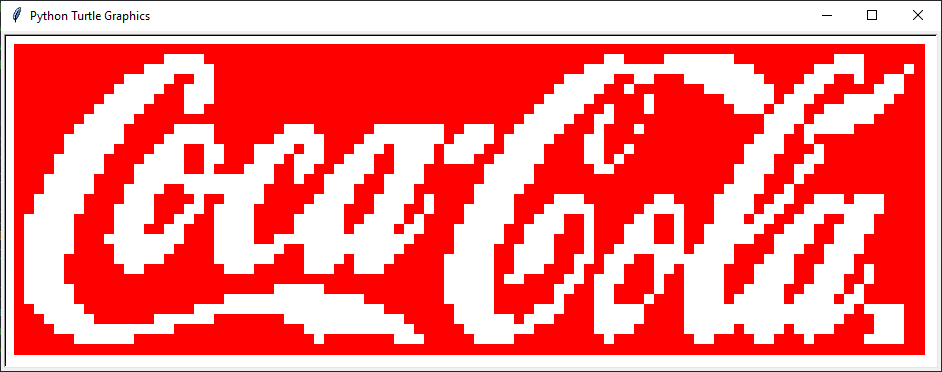
If all goes well, when we execute our code we will have a new window pop up with the complete Coca-Cola logo in red with white letters (see below):
We hope you enjoyed this tutorial. Keep on coding! 👌👌👌
