

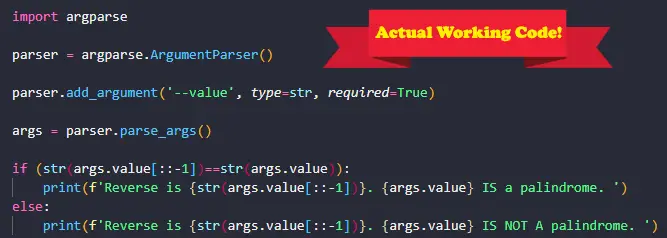
Now let’s do a Python argparse example with code. We will be using Python 3.8.10. Let’s go! ⚡⚡✨✨
In Python, the argparse module makes it possible to provide a command-line interface to the user. More specifically, a user can supply arguments/parameters at the command line to the python script at runtime, without having to include them manually as variables beforehand. We will demonstrate this shortly.
Before we begin, ensure that you have the argparse library installed. You can install it with the following command:
pip install argparseNow that we’ve installed the required library, let’s write some code!
import argparse

parser = argparse.ArgumentParser()

parser.add_argument('--value', type=str, required=True)

args = parser.parse_args()

if (str(args.value[::-1])==str(args.value)):
    print(f'Reverse is {str(args.value[::-1])}. {args.value} IS a palindrome. ')
else:
    print(f'Reverse is {str(args.value[::-1])}. {args.value} IS NOT A palindrome. ')
Let’s explain what is happening here:
- First we import the argparse library.
- The call argparse.ArgumentParser() creates a new ArgumentParser object. This object hold all the info necessary to parse the command line into Python data types. The name of our new object is parser.
- The method add_argument() defines how a single command line argument should be parsed. It accepts 13 possible parameters. In this case, we are supplying only 3 parameters: a name for the argument which is –value, a type for the argument of str which is the type that the argument will be converted to and the required flag which we set to True.
- The method parse_args() converts argument strings to objects. We don’t supply any arguments on this occasion but there are two possible arguments that can be supplied here: args and namespace. By default, both are set to None.
- We do a simple if-else statement to determine if the argument value supplied is a palindrome. Recall that a palindrome is a sequence of words, letters or numbers that reads the same backwards and forwards.
Ok great!🔥🔥 So now that we have written our code, we have to supply the arguments the correct way at the command line. Below is a screenshot of what must be typed at the command line to execute our code properly (Windows 10 OS was used in this example):
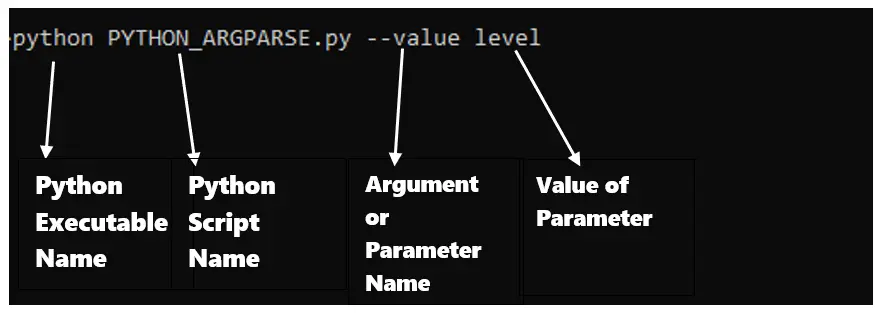
Let’s explain what is happening here:
- Ideally, you’d first open a new cmd window on Windows 10 or a new Terminal on Linux/Mac and type something very similar to the above command.
- The python executable name is usually python but this may differ depending on how you configured your system and python interpreter.
- The python script name is the name of the script file. On my system, the filename is PYTHON_ARGPARSE.py. Ensure that your current directory contains this file and that you spell it correctly.
- The argument name, as defined in our code is value with 2 hyphens before it. This is what we must type at the command line. If you misspell this or leave this out, you will get an error.
- The value of the parameter in this case is level. This is the actual value of the parameter. If you omit this, you will also get an error.
- Make sure that you put one space between each part of the above command when you practice this on your own machine.
If all goes well, you should see the following output when you run the script in the above manner. In this case we use the parameter values of level and william to test the program with 2 cases:
#Output
#Reverse is level. level IS a palindrome.
#Reverse is mailliw. william IS NOT A palindrome.
So that’s it! We used argparse to turn our python script into a command line tool! Neat right? You can find another great tutorial on how to parse a comma separated list with argparse HERE. Find the complete python argparse documentation HERE.
Thank you and good luck!👌👌👌
