No Result
View All Result
DevRescue
  • Home
  • Python
  • Lists
  • Movies
  • Finance
  • Opinion
  • About
  • Contact Us
  • Home
  • Python
  • Lists
  • Movies
  • Finance
  • Opinion
  • About
  • Contact Us
DevRescue
Home Blog Python

Add and Subtract Vectors In Python

by Khaleel O.
August 29, 2021
in Python
Reading Time: 6 mins read
A A
add subtract vectors python

Let’s add and subtract vectors in Python! This is the first part of our Linear Algebra series. Let’s go! ✨✨

Recall that a vector in math is a quantity that describes movement from one point to another. A vector quantity has both magnitude and direction. Check out our previous tutorial on how to plot vectors on graphs in Python.

Let’s start with 2D vector addition. See the general formula below:

Vector Addition

To add vector v and w we simply add the first component of each vector (v1 and w1) which gives us the first component of the sum (v1 + w1). Then we add the second component of each vector (v2 and w2) which gives us the second component of the sum (v2 + w2). Our result is a column vector with the same amount of rows and columns as each of the vectors that comprise the sum (a column vector with 2 rows and 1 column in this case).

It’s really that simple. Let’s write some code to add 2 2D vectors:

import numpy as np

v = np.array([2,3]) 
w = np.array([3,3])
vw = v+w
print(vw[:, np.newaxis])
#Example 1 Output
#[[5]
# [6]]

v = np.array([-2,-3])
w = np.array([3,3])
vw = v+w
print(vw[:, np.newaxis])
#Example 2 Output
#[[1]
# [0]]

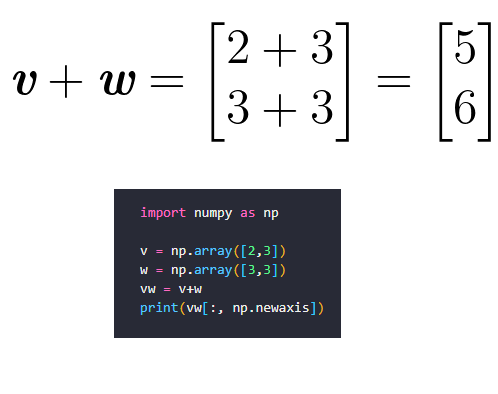
Above we give two examples using numpy arrays. Using numpy gives us the result that we expect in both cases. Example 1 is evaluated as follows:
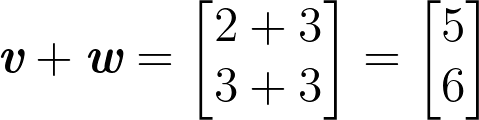
Example 1

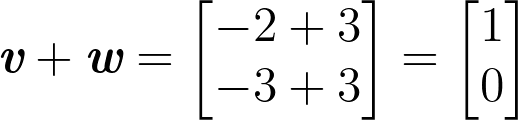
Example 2 is evaluated as follows:

Example 2

Generally speaking adding vectors abides by the commutative law which means:

Adding Vectors is Commutative

Let’s do some 2D vector subtraction. The same principle applies but this time we are subtracting the first and second components which means (v1 – w1) and (v2 – w2) respectively. This gives us the two components of the result vector:

Vector Subtraction

Note that vector subtraction is not commutative. Now let’s write some code:

import numpy as np

v = np.array([2,3])
w = np.array([3,3])
vw = v-w
print(vw[:, np.newaxis])
#Example 3 Output
#[[-1]
# [0]]

v = np.array([-2,-3])
w = np.array([3,3])
vw = v-w
print(vw[:, np.newaxis])
#Example 4 Output
#[[-5]
# [-6]]

Example 3 is evaluated as follows:
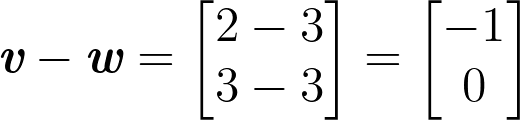
Example 3

Example 4 is evaluated as follows:

Example 4

Now let’s do another example, but this time let’s plot our examples on a graph. First, let’s show how we evaluate the examples:

v+w
v-w

Here’s the code that will evaluate our vector arithmetic and plot them on a graph:

import numpy as np
import matplotlib.pyplot as plt
from matplotlib.pyplot import figure

def plot_vector2d(vector2d, s, origin=[0, 0], **options):
    plt.gca().annotate(f'{s}({vector2d[0]},{vector2d[1]})', (vector2d[0],vector2d[1]),fontsize=13)
    plt.scatter(vector2d[0],vector2d[1], s=5,c='black')
    return plt.arrow(origin[0], origin[1], vector2d[0], vector2d[1],
          head_width=0.2, head_length=0.3, length_includes_head=True,
          width=0.02, 
          **options)

figure(figsize=(8, 6), dpi=80)
v = np.array([4,2])
w = np.array([-1,2])
vw = v+w
plot_vector2d(v,'v', color='black')  #v
plot_vector2d(w,'w', color='black')  #w
plot_vector2d(vw, 'v+w', color='b')  #v+w

vw = v-w
plot_vector2d(vw, 'v-w', color='r')  #v-w

plt.axis([-5, 11, -2, 11])
plt.grid()
plt.gca().set_aspect("equal")

plt.show()

Let’s explain what’s going on here:

  1. We import the numpy and matplotlib libraries which we will use.
  2. We define a function plot_vector2d which accepts a numpy vector (and a few other parameters) and adds them to a vector plot. The plot shows each vector as an arrow that starts at the origin and terminates at the vector point (represented by a small dot at the end of each arrowhead) on the Cartesian plane. Each vector point is also labelled for readability.
  3. We define vectors v and w. We plot the vectors individually, the sum of the vectors (v+w) and the difference of the vectors (v-w) on the same plot.
  4. We set the scale of the x-axis and y-axis.
  5. We show the plot to the user on a square grid graph.

The above code will give us the following plot:
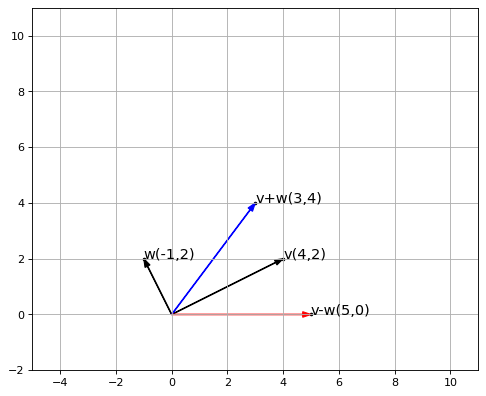
Plot Showing Vector Addition and Subtraction

So we know how to add and subtract vectors in Python and also plot them on a cartesian plane. Next we will be doing vector multiplication. Find the Python Notebook for this tutorial HERE. Find the full code HERE.

Thanks for reading!👌👌👌

Tags: graphlinear algebramatplotlibvector
Previous Post

Python Plot Vector with matplotlib

Next Post

Python writelines With Examples

Khaleel O.

Khaleel O.

I love to share, educate and help developers. I have 14+ years experience in IT. Currently transitioning from Systems Administration to DevOps. Avid reader, intellectual and dreamer. Enter Freely, Go safely, And leave something of the happiness you bring.

Related Posts

Python

Python Fibonacci Recursive Solution

by Khaleel O.
January 16, 2024
0
0

Let's do a Python Fibonacci Recursive Solution. Let's go! 🔥🔥🔥 The Fibonacci sequence is a series of numbers in which...

Read moreDetails
Python

Python Slice String List Tuple

by Khaleel O.
January 16, 2024
0
0

Let's do a Python Slice string list tuple how-to tutorial. Let's go! 🔥🔥🔥 In Python, a slice is a feature...

Read moreDetails
Python

Python Blowfish Encryption Example

by Khaleel O.
January 14, 2024
0
0

Let's do a Python Blowfish Encryption example. Let's go! 🔥 🔥 Blowfish is a symmetric-key block cipher algorithm designed for...

Read moreDetails
Python

Python Deque Methods

by Khaleel O.
January 14, 2024
0
0

In this post we'll list Python Deque Methods. Ready? Let's go! 🔥🔥🔥 A deque (double-ended queue) in Python is a...

Read moreDetails

DevRescue © 2021 All Rights Reserved. Privacy Policy. Cookie Policy

Manage your privacy

To provide the best experiences, we and our partners use technologies like cookies to store and/or access device information. Consenting to these technologies will allow us and our partners to process personal data such as browsing behavior or unique IDs on this site and show (non-) personalized ads. Not consenting or withdrawing consent, may adversely affect certain features and functions.

Click below to consent to the above or make granular choices. Your choices will be applied to this site only. You can change your settings at any time, including withdrawing your consent, by using the toggles on the Cookie Policy, or by clicking on the manage consent button at the bottom of the screen.

Functional Always active
The technical storage or access is strictly necessary for the legitimate purpose of enabling the use of a specific service explicitly requested by the subscriber or user, or for the sole purpose of carrying out the transmission of a communication over an electronic communications network.
Preferences
The technical storage or access is necessary for the legitimate purpose of storing preferences that are not requested by the subscriber or user.
Statistics
The technical storage or access that is used exclusively for statistical purposes. The technical storage or access that is used exclusively for anonymous statistical purposes. Without a subpoena, voluntary compliance on the part of your Internet Service Provider, or additional records from a third party, information stored or retrieved for this purpose alone cannot usually be used to identify you.
Marketing
The technical storage or access is required to create user profiles to send advertising, or to track the user on a website or across several websites for similar marketing purposes.
Statistics

Marketing

Features
Always active

Always active
  • Manage options
  • Manage services
  • Manage {vendor_count} vendors
  • Read more about these purposes
Manage options
  • {title}
  • {title}
  • {title}
Manage your privacy
To provide the best experiences, DevRescue.com will use technologies like cookies to store and/or access device information. Consenting to these technologies will allow us to process data such as browsing behavior or unique IDs on this site. Not consenting or withdrawing consent, may adversely affect certain features and functions.
Functional Always active
The technical storage or access is strictly necessary for the legitimate purpose of enabling the use of a specific service explicitly requested by the subscriber or user, or for the sole purpose of carrying out the transmission of a communication over an electronic communications network.
Preferences
The technical storage or access is necessary for the legitimate purpose of storing preferences that are not requested by the subscriber or user.
Statistics
The technical storage or access that is used exclusively for statistical purposes. The technical storage or access that is used exclusively for anonymous statistical purposes. Without a subpoena, voluntary compliance on the part of your Internet Service Provider, or additional records from a third party, information stored or retrieved for this purpose alone cannot usually be used to identify you.
Marketing
The technical storage or access is required to create user profiles to send advertising, or to track the user on a website or across several websites for similar marketing purposes.
Statistics

Marketing

Features
Always active

Always active
  • Manage options
  • Manage services
  • Manage {vendor_count} vendors
  • Read more about these purposes
Manage options
  • {title}
  • {title}
  • {title}
No Result
View All Result
  • Home
  • Python
  • Lists
  • Movies
  • Finance
  • Opinion
  • About
  • Contact Us

DevRescue © 2022 All Rights Reserved Privacy Policy